PSA Authorization Letter 2026: Can Someone Else Claim Your Document?
Last Updated on October 3, 2026 by gillani
Need someone else to claim a PSA document on your behalf? Here’s what you need to know in 2026: PSA appointment slips are non-transferable and must bear the requester’s name. In practice, this means the person named on the booking is the one expected to show up and claim. Rules for representatives and authorization letters vary by outlet and are not published as a fixed national policy — always confirm with your specific CRS outlet before sending someone else. This guide explains the verified facts and includes a generic sample template (not an official PSA requirement).
Can Someone Else Claim Your Document?
PSA appointment slips are non-transferable and must bear the requester’s name. Here’s what that means in practice:
What You Need to Prepare
If your outlet confirms it will accept a representative, prepare the following (exact requirements vary by outlet):
How to Write an Authorization Letter for PSA
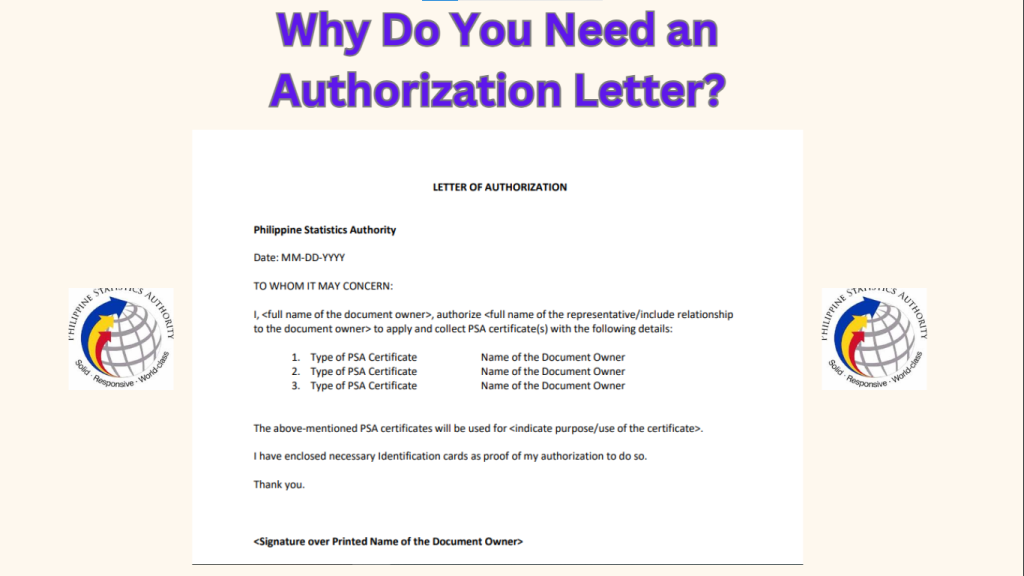
Here’s a simple generic format for reference (not an official PSA requirement):
Sample Authorization Letter
Subject: Authorization Letter for PSA Document Request
Dear Sir/Madam,
I, [Your Full Name], residing at [Your Address], hereby authorize [Representative’s Full Name], residing at [Representative’s Address], to process my PSA document request on my behalf.
The documents I am requesting include:
- [List of documents, e.g., Birth Certificate, Marriage Certificate, etc.]
I have attached a copy of my valid ID and my representative’s valid ID for your reference. Please assist them in processing my request.
Thank you for your assistance.
Sincerely,
[Your Signature]
[Your Full Name]
[Your Contact Number]
Step-by-Step Guide to PSA Online Appointment with Authorization Letter
Step 1: Prepare the Authorization Letter
Write the authorization letter using the format above. Make sure to include all required details and sign it.
Step 2: Visit the PSA Website
Go to the official PSA website: https://www.psa.gov.ph. Look for the “Online Appointment System” or “Serbilis Outlet Services” section.
Step 3: Create or Log In to Your Account
Step 4: Choose Your Preferred PSA Branch
Select the PSA branch nearest to you. If you’re in a major city like Manila, Cebu, or Davao, choose the most convenient location.
Step 5: Select the Document You Need
Choose the type of PSA document you need, such as:
Step 6: Pick a Date and Time
The system will show available slots. Choose a date and time that works best for your representative. Pro tip: Arrive 10-15 minutes early to avoid delays.
Step 7: Pay the Processing Fee
Document fees depend on the channel. At the CRS outlet counter: ₱155 per copy for birth, marriage, and death certificates; ₱210 per copy for CENOMAR/CENODEATH. PSAHelpline (physical delivery): ₱365 per copy for birth/marriage/death, ₱420 per copy for CENOMAR. Payment options shown at checkout vary by channel.
Once payment is confirmed, you’ll receive a confirmation email with your appointment details.
Step 8: Provide the Authorization Letter to Your Representative
Give the signed authorization letter, along with a copy of your valid ID, to your representative. They will need these documents when visiting the PSA office.
Step 9: Your Representative Visits the PSA Office
On the scheduled date, your representative will visit the PSA office. They must bring:
Tips for a Smooth PSA Online Appointment with Authorization Letter
Quick Summary: PSA Online Appointment with Authorization Letter
| Step | What to Do |
| Step 1 | Prepare the authorization letter and required documents. |
| Step 2 | Visit https://www.psa.gov.ph. |
| Step 3 | Create an account or log in. |
| Step 4 | Select your preferred PSA branch. |
| Step 5 | Choose the document you need. |
| Step 6 | Pick a date and time. |
| Step 7 | Pay the fee for your channel (outlet counter: ₱155/₱210; PSAHelpline: ₱365/₱420). |
| Step 8 | Provide the authorization letter and your ID to your representative. |
| Step 9 | Your representative visits the PSA office on the scheduled date. |
FAQs
Conclusion
Because PSA appointment slips are non-transferable and must bear the requester’s name, the safest approach is for the named requester to claim in person. If you must send someone else, confirm your outlet’s representative rules first — they vary by outlet and are not a fixed national policy.
Related guides: PSA online payment options, pay for PSA certificates by GCash, PSA online appointment QR code, checking your PSA appointment status, PSA appointment for senior citizens, and PSA online appointment for minors.